Submagic alternatives in 2026: caption makers compared for short video
By Andri Peetso, maker of Creator Toolset · Updated
A 40-second clip from your phone is ready, and each word should light up as the speaker says it before the post goes live tonight. The question is which caption tool gets you there without paying for a plan you do not need.
We make Creator Toolset. It is on this list where it fits, and each pick says when something else is the better choice.
The short answer
- If you need captions and clips from longer videos in one tool, pick Submagic. Its paid plans list a Magic Clips count.
- If you caption from an iPhone, pick Captions. Its pricing page shows iOS plans only, and its free plan has one caption template.
- If you already cut in CapCut and want its auto captions, pick CapCut.
- If you need translated captions, dubbing or lip sync, compare Kapwing's paid plans with Submagic Pro, which includes AI translated captions.
- If you want the words as a caption file or a transparent layer for your own editor, pick Caption Studio.
- If you want to edit the video by changing its transcript, pick Descript.
- Stay with Submagic if you need AI Clean audio, which its Starter plan does not include.
Compare the caption tools
| Tool | Caption features the page names | Free plan | Cheapest paid plan | Where it runs |
|---|---|---|---|---|
| Submagic | Magic Clips, AI translated captions, AI Clean audio | No free plan listed; no card needed to start | Starter $12 a member a month, billed yearly | Not stated |
| Captions | AI captions and subtitles, translation | Free plan: 1 caption template, no AI credits | Max $24.99 a month, billed monthly | iOS plans per pricing page; other platforms not stated |
| CapCut | Auto captions from video and audio | Free plan; limits not stated | Pro $17.99 a month, or $149.99 a year | Windows and macOS desktop |
| Veed | Automatic subtitles, translation, AI clip generator | Not stated | Not stated | Not stated |
| Kapwing | Auto subtitling, translation; dubbing and lip sync on paid plans | 10 minutes of auto subtitling; 720p; watermark | Pro $16 a month (billing not labeled) | Browser-based editor |
| Descript | Dynamic captions (animated); text-based editing | 60 minutes of media a month; 720p; watermark | Hobbyist $24 a month billed monthly, or $16 billed annually | Not stated |
| Caption Studio | Karaoke word highlight; SRT, WebVTT and ASS files; burned-in MP4 or transparent layers | No paid plan; the app is free and open source | No paid plan | Browser for transcription; Mac app on Apple silicon with macOS 14 or later |
Prices are from each vendor's own pricing page as of 10 November 2026. Captions prices are for iOS plans. Submagic prices are per member.
If you want clips and captions together
Submagic finds clips as well as captions. Magic Clips is on every paid plan, with 5 on Starter, 15 on Pro and 37 on Business. Pick it when the same team makes captioned clips every week. Starter is $12 a member a month billed yearly, or $19 billed monthly. Pro is $23 a member a month billed yearly, and Business is $41 billed yearly. Starter excludes silence and bad-take removal, AI Clean audio and translation, so check the plan before you buy it for captions alone. Submagic pricing
If you caption on an iPhone
Captions is an AI video app, and its pricing page says the prices and features reflect iOS plans only. Max is $24.99 a month billed monthly, with 500 credits and 2 seats. Frontier is $69.99 a month with 1,400 credits and 3 seats. The free plan gives one caption template against 100 or more on paid plans, and it has no AI credits. The page gives no yearly amounts, only a note that yearly billing is paid up front at a discount. Captions pricing
If you already cut in CapCut
CapCut's desktop app adds auto captions from video and audio to the editing you already do. Pick it if you cut and caption in one place on a Windows or Mac computer. Pro is $17.99 a month or $149.99 a year, with a 7-day trial. The desktop page names auto captions but not caption animation styles, so check the styles on CapCut's pricing and product pages before you rely on a word-by-word look.
If you need translation, dubbing or lip sync
Kapwing is a browser-based editor with auto subtitling, translation, clean audio and text to speech. Dubbing is on Pro and Business, and lip sync on Business. Its free plan gives 10 credits, up to 10 minutes of auto subtitling, exports up to 720p and 4 minutes long, and a watermark. Pro is $16 a month and Business is $50 a month, and the card does not label the billing period. Kapwing pricing
Veed's home page names automatic subtitles, translation and an AI clip generator. Its pricing page does not state plan prices, so check its plans before you judge the cost.
If you want to edit the words as well
Descript captions are animated, and its text-based editing lets you cut the video by changing the transcript. Pick it when the cut and the captions should happen in one tool. The free plan allows 60 minutes of media a month, 720p exports and a watermark. Hobbyist is $24 a month billed monthly, or $16 billed annually. Descript pricing
If you want a caption file or a layer for your editor
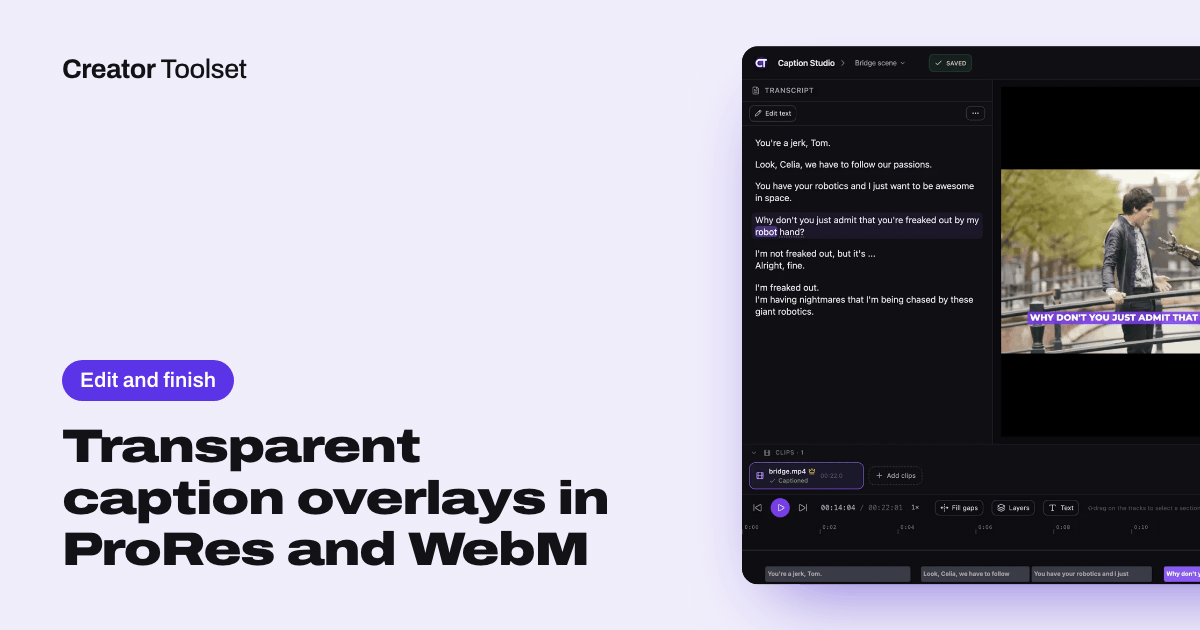
Caption Studio can transcribe the speech in the browser with Whisper, so you can avoid a cloud transcription service. It highlights each word as it is spoken, and it exports SRT, WebVTT and ASS files. It can also burn the captions into an MP4, or export a transparent layer as ProRes 4444, WebM or a PNG sequence for your own editor.
Caption Studio does not find clips in a long video, and its AI-written lines need an AI plan or key. Read the browser Whisper guide and the transparent caption overlay guide before you choose it for that job.
How we chose
The picks come from what each vendor publishes: plan prices, free plan limits, platforms and caption features on its own pricing or product page, read on 10 November 2026. We did not test these tools side by side on the same clip. The Caption Studio entry describes what its own source code does.
Try two on the same clip
Caption the same 40-second clip in two tools, using the same words. Check that the transcript matches the speech, that the highlight follows the words, and whether the export carries a watermark. Captions' pricing page does not say whether its free plan adds one, so test that yourself. Submagic lists no free plan, but says no credit card is needed to start. The tool that gets the words right with the least fixing is the one to pay for. For more options aimed at reels, see the AI tools for editing reels roundup.
 Submagic vs Captions
 Opus Clip alternatives
 Transparent caption overlay export