Caption Studio: a free, open-source caption maker
By Andri Peetso, maker of Creator Toolset · Updated
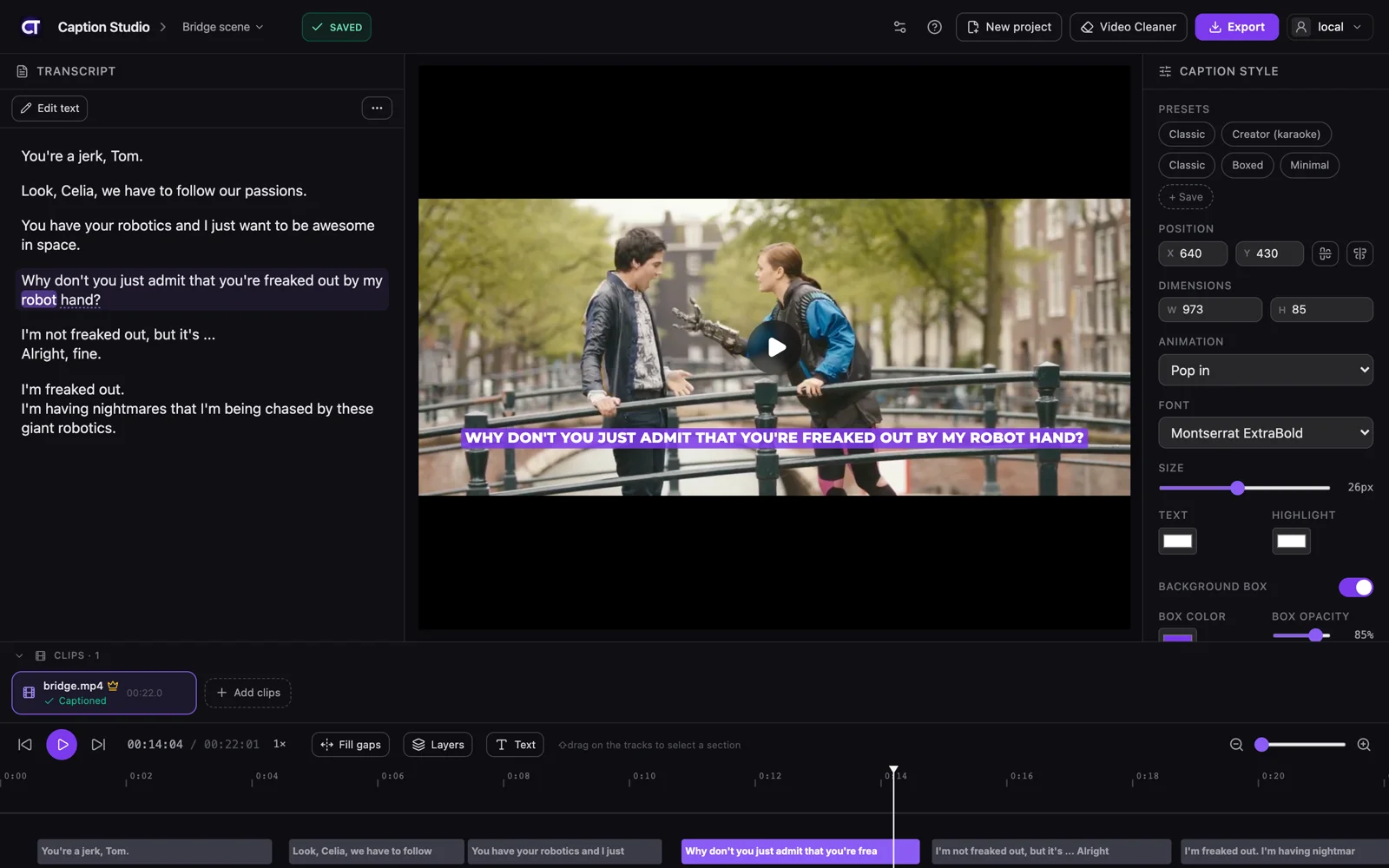
You filmed a talking-head video from a script you wrote the night before. The captions still need making, and the transcriber has heard one name in the script as three different words. Caption Studio is the page where you fix that once and export the captions with the video.
Caption Studio turns the speech in a video into timed captions, sets them in lines on the screen, and exports the video with the captions burned in, or the captions alone as a file. It is one tool in the free, open-source Creator Toolset Mac app. Unless a Deepgram key serves your account, transcription runs in the browser on your device, so you bring nothing to start. A Deepgram key for faster cloud transcription, and an AI provider for the cadence pass, are optional.
Make the captions
- Drop the videos on the import screen. It says Drop videos here, or click to browse. The picker takes .mov, .mp4, .mkv, .webm and .m4v files.
- In the setup dialog, name the project. You can paste the script into the box that says "Paste the script you filmed from". The box holds up to 40,000 characters. The AI uses it to fix names and words the transcriber heard wrong.
- Tick Match cadence after transcription if you want the cadence pass to set the line breaks.
- Click Transcribe now for one clip, Transcribe all N clips for a batch, or I'll transcribe later. In the player, the button is Transcribe, next to an engine picker.
- Read the transcript and correct the names and words in the transcript panel. Click Match cadence there again after you edit. The button reads Re-match cadence once there are changes to apply.
- Pick a style preset: Classic, Creator (karaoke), Boxed or Minimal.
For the in-browser route in more detail, with the SRT and WebVTT files, see Captions and SRT/VTT files with Whisper in the browser.
Export the captions
Open the export dialog. Its tabs are Video with captions, Captions only and Recent. Pick a format. For a burned-in MP4, pick an engine, Fast or Pixel-perfect, and then where it renders: This device · no upload or Cloud background. The export button at the bottom names the job it will start.
The formats the dialog offers are:
- MP4 · H.264 captioned and MP4 · H.265 captioned. The dialog says the H.265 file is about 35% smaller and renders more slowly.
- MOV · ProRes 4444 and WebM · VP9, both with an alpha channel, for a transparent layer over your edit. A MOV over 60 seconds shows a warning of about 2 MB per second of video.
- PNG sequence (ZIP), one transparent PNG per frame.
- SRT subtitles, WebVTT subtitles and ASS subtitle file.
For the transparent layer, see Styled captions as a transparent layer over your edit.
The first likely stop is a missing source. If the original file is no longer on this device, the dialog says so and asks you to choose Cloud background or attach the source again. The second is This device greyed out with "Unavailable for this codec", which means the browser cannot encode that video locally. Choose Cloud background instead.
The job is done when the export plays from the first caption to the last with the names spelled right.
How it works inside
Transcription. With no saved choice, the local engine runs. Its first model is Base · Any language (recommended), Xenova/whisper-base, a 291 MB download the first time. Base English is the same size. Tiny English is 152 MB, and Small English is 968 MB and needs WebGPU. The model runs in a browser worker through @huggingface/transformers, on full-precision weights, in 30-second chunks with a 5-second stride, and asks for word timestamps.
The cloud engine is Cloud · Deepgram nova-3 (best, instant). The app sends the audio as 16 kHz mono WAV. Audio longer than 47 seconds is cut into 45-second windows with 2 seconds of overlap. When a Deepgram key serves your account, and your account is allowed to use it, the player switches the default to cloud, unless you have already picked an engine. An admin's account can use the server's key, and a locked account sees cloud greyed out.
Lines. A word with no end time gets one 0.25 seconds after its start. No word ends less than 0.05 seconds after it starts. Caption cues are split at most at 8 words, 84 characters or 4.5 seconds. A cue also breaks after a full stop, question mark or exclamation mark, and after a comma, semicolon or colon once it has three words.
Layout. Layout runs in the browser. An extra line costs 2 in its score, a lone word on its line costs 3, a stack of captions runs at most 5 seconds, and a pause of 1.2 seconds or more ends the stack. In box mode, characters per line are the frame width times the box percentage, divided by the font size times 0.55.
Cadence pass. This is the server's AI. It sends the transcript in pieces of up to 500 words, up to six at a time, and sends a second request when one has not answered after 40 seconds.
Renders. Fast is ffmpeg with libass on the server, using ASS built in the browser. Its own hint says minor visual differences are possible. Pixel-perfect runs headless Chromium, takes a screenshot of the caption surface for each frame, and pipes the frames to ffmpeg. This device renders in the browser with WebCodecs and mediabunny.
The open-source parts it stands on are @huggingface/transformers, mediabunny (MPL-2.0), FFmpeg with libass, and Playwright's Chromium. Deepgram is a paid hosted service, not open source.
What it needs and where it stops
- Keys. The local route needs nothing. A Deepgram key goes under Settings → API keys. The cadence pass needs an AI provider, set under Settings → Providers. Without one, the Match cadence button is hidden.
- Platform. Only the Mac app is out today, on Apple silicon with macOS 14 or newer. Other systems and phones are not released.
- Limits in the code. A server render can run up to 3,600 seconds, at 16 to 4,096 pixels wide or high and 1 to 120 frames a second. Renders are kept for 24 hours. One export runs at a time by default. A render holds at most 100,000 caption cues and 10,000 text overlays. Clips can be uploaded up to 100 GiB each. Scripts are capped at 40,000 characters.
- Where another tool fits better. Caption Studio does not cut footage. Make the cut in your editor, then bring the captions in as an SRT file or as a transparent layer. If you want text-based video editing, a dedicated editor does that job and this page does not.
 Browser Whisper captions and SRT
 Transparent caption overlay export
 Submagic alternatives