How to analyze competitor Instagram reels by the numbers
By Andri Peetso, maker of Creator Toolset · Updated
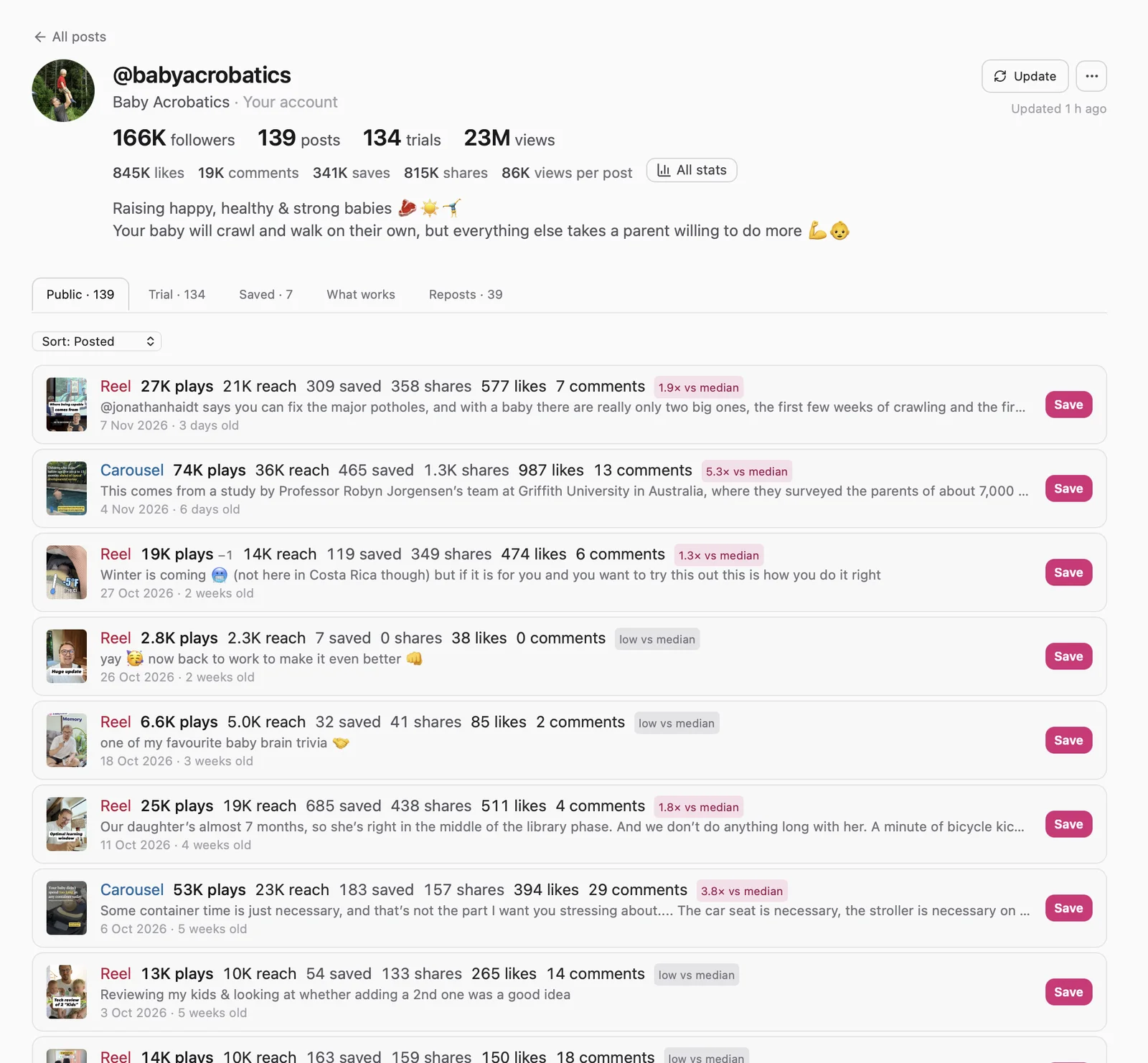
You open three competitor accounts on a Tuesday. One reel has 40,000 plays and another has 900. You cannot tell from that whether the 40,000 is a lucky post or the account's normal, and an account with 2,000 usual plays and one with 200,000 usual plays look the same in a list of raw numbers.
The method is short. Collect each post with its numbers. Write down the opening line of each one. Group the posts by topic and by format. Divide each post's plays by its own account's median, not by the other accounts' numbers. Then remake only the ideas that beat their account's normal and show up more than once. Creator Toolset's Content Analyzer does the collecting, the hook reading and the comparison. A spreadsheet does the same job if you prefer to keep it by hand.
Pick three to five accounts and a time window
Choose accounts that make the same kind of content for the same kind of viewer. Keep the window to the last 90 days, so the numbers reflect how the account posts now. Five accounts with a few posts each give you a picture. Five accounts with two hundred posts each give you more data than you need to start.
Collect the posts with their numbers
Each post needs its link, date, kind (reel, carousel or post), plays, likes and comments.
In the Content Analyzer
- Open the Analyzer and paste a profile link or an @username into the box that reads "Paste post links, a profile link or @username".
- Wait for the account's posts to read. Each post shows its plays, likes and comments when you open it.
- Open the account page to see its posts, and each post's plays as a multiple of the account's median.
The Analyzer reads other creators' public posts with your own Apify key. Apify bills you for each read. You add the key in Settings → API keys, in the row called Apify. Apify's pricing page lists a free plan with $5 of platform usage a month (checked on 10 November 2026 at apify.com/pricing). Check what a run costs in your Apify account before you pull a large number of accounts.
The Analyzer does not scrape web pages. Your own posts come through the official Instagram login, and the Analyzer uses that login for your own account only.
In a spreadsheet
Make one row per post and one column per field: account, link, date, kind, plays, likes, comments. Copy the numbers from each post's page on Instagram. Sort the sheet by account so each account's posts sit together in one block.
Transcribe the hook
The hook is the first line, or the first three seconds. Write down exactly what is said and what text appears on screen in the first three seconds. This is the part a comparison of numbers cannot show you.
In the Analyzer, each post can run the Transcript & on-screen text job. It writes the spoken words and the on-screen text with timings. Read the first few seconds of the transcript, and the first on-screen line, and copy them into a column called Hook.
In a spreadsheet, play the first three seconds, then type the words. Do this for every post, including the weak ones. The weak posts show you which openings do not work.
Group by topic and format
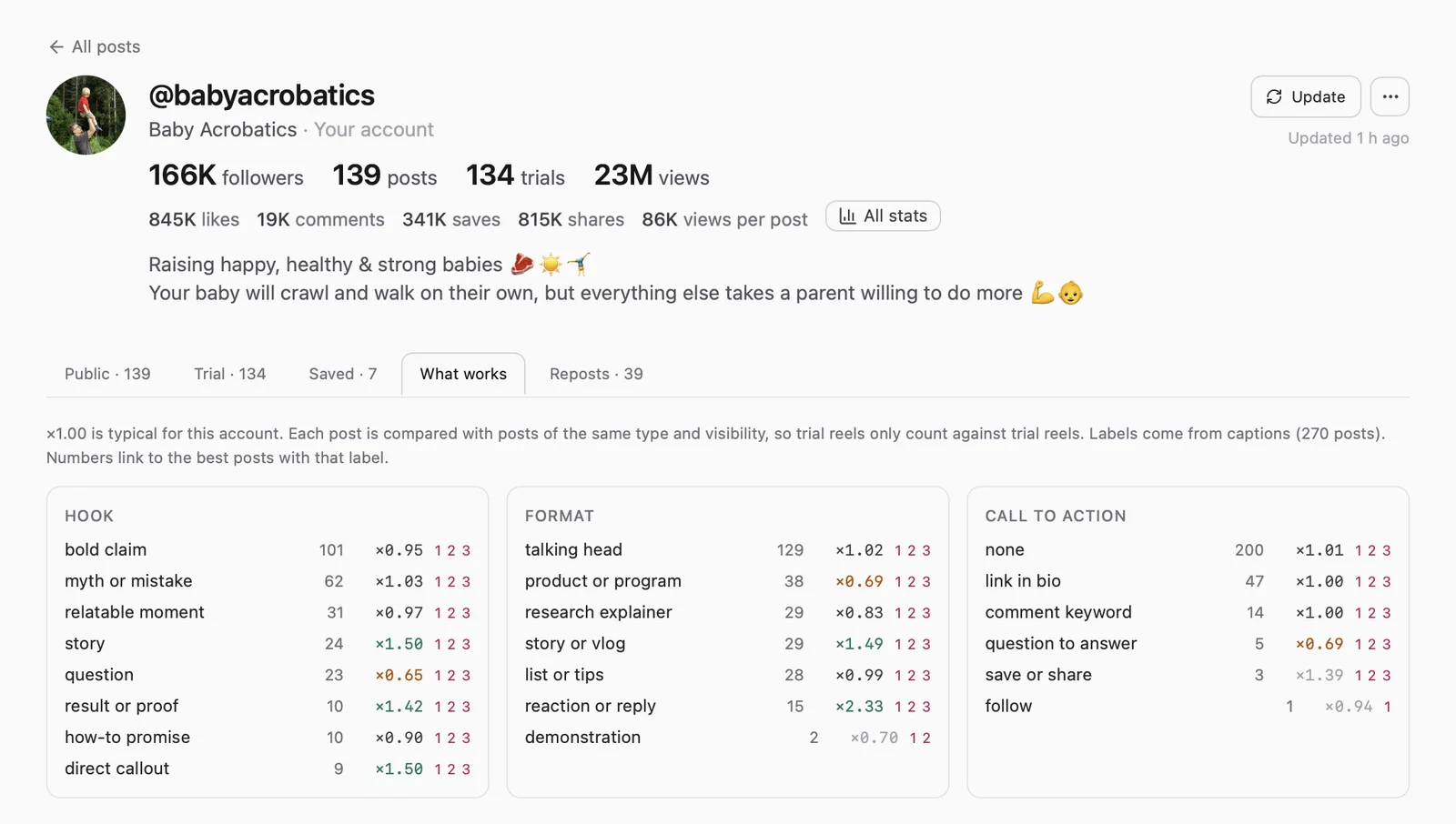
Give each post a topic in a few words ("car seat install", "sleep routine") and a format ("talking head", "text over b-roll", "carousel"). Use the same words for the same things across all accounts, or the groups will not match up.
In the Analyzer, each post has a Kept for field with three choices. Content means you might remake this idea. Format means you are keeping the layout but not the topic. Both means either. Choose one per post as you read it. Stack as one topic groups several posts under one name, and Add to topic puts a post into a group you already have.
The Analyzer's Idea job writes one short line per post that says what the post is about. Use it to fill the topic column faster, then correct any line that misses the point.
Compare each post with its own account
This is the step that makes the numbers fair. For each account, find its median plays across the window. Then divide each of that account's posts by the median.
A post at 2 times the median did twice as well as that account usually does. A post at 0.4 times did worse. The comparison stays inside one account, so a small account and a large one can be compared on the same scale.
In the Analyzer, the account page shows each post's plays as a multiple of the account's median (for example "2.3×") and marks posts in the bottom fifth as "low". The page says "vs median" under the figure.
The app uses the median, not the mean, because one viral post pulls an average upward. If you work by hand you can use the average instead. Use the same measure for every account, and say which one you used in your notes.
In a spreadsheet, sort by account, then type the median in one cell for each block with =MEDIAN(E2:E18) (change the range to match the account's rows). In the next column, divide each post's plays by that cell with =E2/$M$2.
Decide what to remake
Shortlist the posts that reach about 1.5 times their account's median or more. Look for a topic or a format that shows up in two or more of the shortlisted posts. One lucky post tells you little. The same topic working on two accounts is a pattern worth testing.
Remake the idea in your own way. Use your own opening line, your own examples and your own order of points. Do not copy the competitor's sentences. If the pattern is a format, such as a before-and-after on a shelf, build it with your own footage and your own words.
Where Creator Toolset fits. The Analyzer does the reading and the ranking. When you have a shortlist, the Analyzer's Open a Content Workshop session with these posts as sources option opens a Content Workshop session with these posts attached, so the writing can start from them. You still decide what to make. Writing the script in your own voice is the next step.
Check the method on a small run
Before you trust the shortlist, check two things.
- Count the posts per account. Four posts give a noisy median. If an account has fewer than about ten posts in the window, say so next to its numbers and treat its ratios as a guess.
- Refresh the numbers on a shortlisted post a second time, a day or two later. Plays grow for days after a post goes up. If a post's plays are still climbing fast, it may beat the median more than it does today.
If the account shows "low" for almost every post, the median is probably being pulled down by a few very weak posts or by reposts. Look at the list before you decide the account is weak.
What goes wrong, and the fix
The most common problem is an error from the account read. An Analyzer message that says "Your Apify key isn't working" means the key was refused. Paste a fresh key in Settings → API keys, then run the account again. A private account has no public posts to read, so the Analyzer has nothing to show; choose a public account instead.
You are done when
- Every post in the window has its numbers, its hook and one topic.
- Each post has a ratio against its own account's median.
- You have a short list of two to five posts, each above the line you chose, and at least one topic that shows up in two of them.
- You can say in one sentence what you will remake, and how it will differ from the original.
 Reel scripts in your voice
 Instagram carousels with Claude
 Remove retakes from a take